Short answer
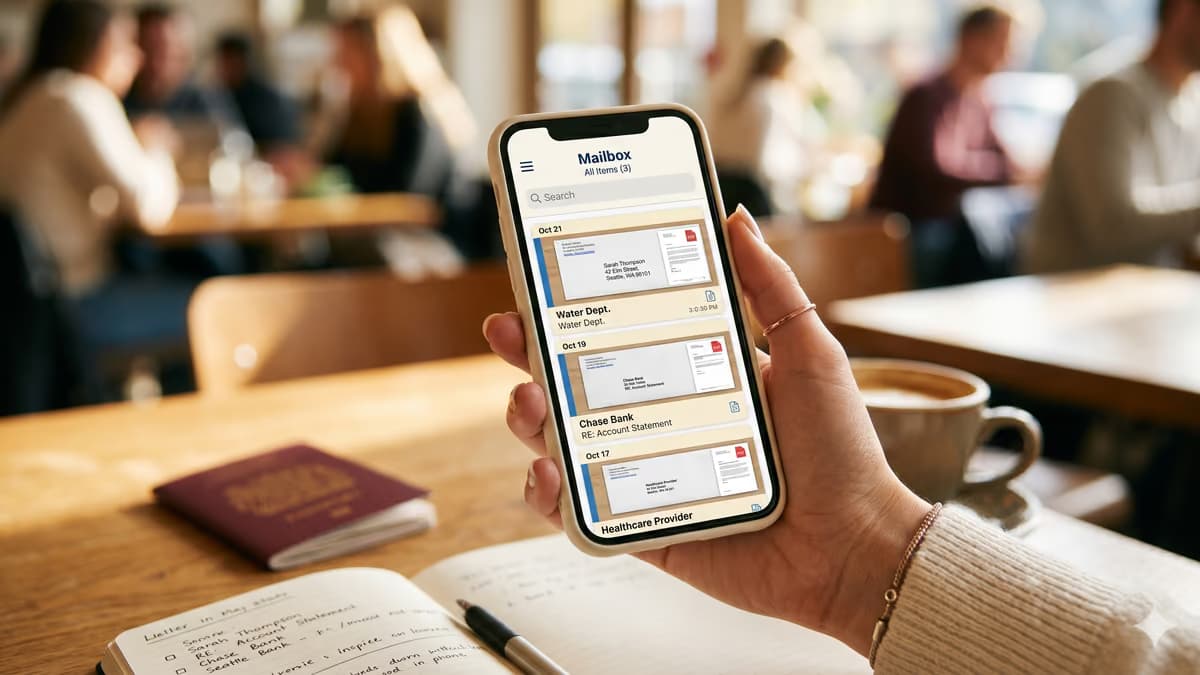
Yes, individuals can use a virtual mailing address, not just businesses. You get a real US street address with package acceptance from all carriers and mail scanning to a digital inbox, no company required, so your home address stays private.
Key takeaways
- Virtual mailing addresses are fully permitted for personal use, even though the building itself is commercial; the mail authorization paperwork supports both individuals and businesses.
- Personal use cases include bank statements, tax notices, and online shopping packages while keeping the home address private. Government ID records are a separate question. The residence field on a license or state ID asks for your principal residence. No state document we read says whether this kind of address is acceptable in the mailing field.
- A virtual mailing address differs from a P.O. box in that it accepts packages from all major carriers (USPS, UPS, FedEx, and others) and provides scanning to digital inbox.
Who this is for
- Frequent movers, snowbirds, and travelers who need a stable US mailing address.
- Individuals who want to keep their home address off online accounts, subscription lists, and public records.
A virtual mailing address is not a business-only product. Individuals can sign USPS Form 1583, list the address as a personal mailing address, and receive mail at a real US commercial street address. The service runs the same way as it does for a company, only the use case shifts from a business to a person.
Did this answer your question?
Who Actually Uses a Personal Virtual Mailing Address
Many of the people who sign up for virtual address services are not running a registered business at all. They want a stable, private US address that follows them when life moves around. The five groups below cover most personal accounts we see.
- Frequent movers and renters who do not want to update their address with the bank, DMV, and a dozen subscriptions every time they move.
- US citizens living abroad who still need a US address for IRS notices, brokerage accounts, and online retailers that do not ship internationally.
- Digital nomads and full-time RVers without a fixed home base, who need an address that is not a friend's couch.
- People separating their public address from their home for safety reasons, including domain registrations, court records, or stalking concerns.
- Adult children handling parents' mail, or anyone consolidating household mail into a single digital inbox.
Allowed even though the building is commercial
A virtual mailing address sits inside a real commercial building, not a residence. That does not block personal use. USPS Form 1583 has a specific section for individual applicants, so personal use is contemplated rather than an exception. What the address can be used for is then decided form by form, and the residence field on a driver's license is one place it does not go.
Ready to set up your business address?
See which US cities fit — about a minute, no card needed.
What You Can Put the Address On
A personal virtual mailing address behaves like a regular street address for most institutions. A few specific records have rules about residential vs commercial addresses, so the table below shows what works and what does not.
| Use case | Works? | Notes |
|---|---|---|
| Bank statements, brokerage, retirement accounts | Yes | Most banks treat it as a normal mailing address. Some ask for a separate residential address on file. |
| Online shopping, Amazon deliveries, returns | Yes | Packages from FedEx, UPS, USPS, and Amazon are received and logged. |
| Magazine subscriptions, club mail, loyalty programs | Yes | Standard delivery, scanned or forwarded on schedule. |
| IRS correspondence, state tax notices | Yes | The IRS accepts a commercial mailing address. Update with Form 8822 if you previously used a home address. |
| Driver's license, state ID, voter registration | Limited | The residence field asks for two things under 6 CFR 37.11(f) and 37.3: a street address, and that it be your principal residence. This address clears the first and fails the second. The documents we read that name a separate mailing field keep it apart from the residence field, though none of them says whether this kind of address is acceptable there. |
| US Passport renewal mail | Yes | The State Department mails the new passport to whatever address you list, including a virtual mailbox. |
| Jury duty, court summons | No | Court records tie to your residential address, not a mailing address. |
Where a personal virtual mailing address is accepted, and the few places it is not.
Mailing address vs residential address are not the same
A virtual address is your mailing address, the place where mail physically arrives. It is not a substitute for a residential address on documents that legally require one, such as a driver's license residence field, the home address box on a voter registration form, or homestead exemption. The documents we read that name both fields keep them apart, and that separation is real. What we could not find is any state document saying whether this kind of address is acceptable in the mailing field, and silence is not permission.
How USPS Form 1583 Works When You Are Not a Business
USPS Form 1583 is the document that authorizes a Commercial Mail Receiving Agency, the legal name for a virtual mailbox provider, to receive mail on your behalf. It is a federal requirement, not a company policy, and it has a specific path for individual applicants.
- 1The form has a name field for the applicant, and as an individual, this is just your full legal name. No company name is required.
- 2Business name and business type fields are optional. Individual users can leave them blank or write "personal". There is no penalty for not having a registered business.
- 3Two forms of ID are required. One must be photo ID, such as a passport or driver's license. The second can be a recent utility bill, lease, or another government-issued document with your name and current address.
- 4The form has to be notarized. Most virtual mailbox providers offer remote online notarization, typically under $50 (some providers include it in the plan), so you do not need to find a notary in person.
- 5Once submitted, mail handling typically activates within 1 to 2 business days.
Adding family members to one account
USPS Form 1583 lets you authorize multiple recipients at the same address, including spouses and minor children. Each adult fills out a separate PS Form 1583, though most providers charge for just one shared household mailbox. This is how households with shared mail handle the form without opening multiple accounts.
Mail Handling Choices for Personal Use
Once mail arrives at the address, you choose what happens to each piece. Personal accounts usually pick a lighter touch than business accounts, since the volume is lower and the urgency is different.
| Action | How it works | Best for |
|---|---|---|
| Scan the envelope | You see a photo of the unopened envelope in your dashboard within one business day. | Quickly triaging junk vs important mail without paying to open everything. |
| Scan the contents | The provider opens the letter and uploads a PDF of the pages. | Tax notices, bank statements, anything you need to read remotely. |
| Forward by mail | Physical pieces are bundled and shipped to wherever you are that month. | Travelers and expats who need passports, debit cards, or original documents. |
| Shred and recycle | The provider destroys the piece on request. | Junk mail, expired offers, anything you do not want sitting in storage. |
| Hold for pickup | Mail stays at the facility until you collect it. | Local users who pass through occasionally. |
Common mail-handling actions and when each one fits a personal account.
Personal Virtual Mailbox vs P.O. Box
A P.O. box is the obvious comparison for personal mail. They look similar from the outside, but they behave very differently as soon as you try to use them as a real mailing address. If you are specifically wondering whether USPS itself offers a virtual address, the short answer is no, and the USPS virtual address guide explains what the Postal Service does and does not provide.
| Factor | Virtual mailing address | USPS P.O. box |
|---|---|---|
| Address format | Real street address with a suite or unit number. | P.O. Box 1234 format. |
| Accepts FedEx, UPS, Amazon | Yes, all carriers deliver. | USPS only at most boxes. Some accept private carriers via Street Addressing. |
| Bank account address field | Generally accepted, though some banks may also ask for a separate residential address on file. | Frequently rejected by banks and brokerages. |
| Remote access | Full web dashboard, scan on demand from anywhere. | You go physically to the post office to check. |
| International forwarding | Most providers ship globally. | USPS forwarding is built primarily for US destinations; international forwarding is limited and handled piece by piece. |
| Cost | Typically $10 to $30 per month for personal-use plans. | $50 to $300+ per year depending on box size and location. |
Personal virtual mailbox vs USPS P.O. box, side by side.
When a P.O. box still wins
If you live in the same town for years, never travel, never order from a non-USPS carrier, and never need a bank to accept your address, a P.O. box is cheaper and simpler. For everyone else, the workflow limits of a P.O. box add up quickly. Americans who move overseas run into those limits first, because banks and the IRS both keep writing to a US address; the expat mailing address guide covers what changes.
Picking the Right Plan as an Individual
Personal mail volume is usually a fraction of what a business handles, so the cheapest tier is often enough. Three questions narrow the choice quickly.
- 1How much mail do you actually receive? If it is under 10 pieces a month, a basic plan covers you. Heavier mail, such as bills, tax forms, and medical records arriving monthly, may push you to a mid-tier plan with included scans.
- 2Do you need physical forwarding? Travelers and expats almost always do. Locals who can drop by rarely do. Forwarding pricing varies more than mailbox pricing, so check that line carefully.
- 3How important is the address city? A New York or Los Angeles address carries different weight than one in a small town, even for personal use. Pick a city consistent with your other records.
What to look for in a personal plan
Personal users do not sign annual leases. Month-to-month plans without setup fees limit commitment to the next 30 days. If life changes, you cancel and the mail stops within one billing cycle.
Where save office Fits
save office runs the same address service for individuals and businesses. The USPS Form 1583 supports both an individual and a business applicant, the dashboard handles personal mail the same way it handles business mail, and pricing starts low enough that personal use makes sense from day one.
To get a personal virtual address, see the pricing page for the address-only and mail-scanning tiers, or read the beginner's virtual office guide for a fuller walkthrough of how the service works end to end. Activation follows once the standard mail authorization is complete.
Frequently Asked Questions
Not sure what you need?
Two short pages sort it out — what the products actually are, and which situation you're in.
Watch this in 60 seconds
Henry covers the same ground on video.